Saturday, January 9, 2010

PR1ORITY Broadband

PR1ORITY
BROADBAND

STRENGTH YOU NEED TO TAKE DOWN YOUR RIVALS

A BETTER SOLUTION

PR1ORITY BRAODBAND by P1 a Wireless Internet Leased Line service that puts your business connectivity first, giving it greater presence at long-time cost saving rates. It's an optimum choice for those expecting high performance and reliability from their Internet Service Provider.

WHY PR1ORITY BROADBAND?

Dedicated Network
• High performance dedicated broadband service compared to traditional shared broadband network
• Full bandwidth customisation
• Unlimited network traffice
Optimum Connection
  • Impressive bandwidth of 100Mbps and beyond
  • Around the clock network monitoring for top-notch performance
  • Guaranteed uptime with Service Level Agreements (SLA) at 99.6%
  • Usage of fibre and microwave as backhaul
Prompt and Personal Service
  • Dedicated Account Manager to personally manage all your needs
  • 24/7 toll-free customer support
Easy and Quick Installation
  • 2 weeks installation period instead of the usual 1-2 months wait
Fixed Address in the Cyber World
  • New business opportunities with e-commerce
  • Increased security with IP-based surveillance cameras
  • Lower operational and maintenance costs with remote monitoring, repairing and upgrading
  • Video conferencing services
  • Voice communications

HOW DOES IT WORK?
  • Direct connection from your premises to the nearest Internet Gateway via an encrypted network
  • Optimum quality of service with a wireless transmission via a dedicated leased line


Service Availability

PR1ORITY BROADBAND is available in all areas within P1 WIMAX coverage and extendable beyond.

TAILOR MADE PLANS
FOR YOUR VARIOUS NEEDS


Basic 512Kbps~2Mbps
For ‘light’ usage
From RM2000++ per month
Advance 3Mbps~8Mbps
For ‘standard’ usage
From RM3500++ per month
Premium 10Mbps and beyond
For ‘high speed’ usage
From RM8000++ per month

Add-on benefits

* FREE 5 fixed IP address (worth RM750)
* Waived registration & installation fees (worth RM4300)
* Service satisfaction guaranteed

SUCCESS STORIES OF PR1ORITY
BROADBAND PIONEERS


"We can expand our business without worrying about the bandwidth limitation. furthermore, we have not received any complaints from dealers regarding slow connections or disconnection since , and our sales turnover has increased by 100%."

xPrint Sdn Bhd is a printing company which prides itself in quality and prompt service. As an online printing provider, speedy and stable Internet connectivity is a must have for business expansion. PR1ORITY BROADBAND was their choice because of the reliability, stability, and value.


SUCCESS STORIES OF PR1ORITY
BROADBAND PIONEERS


"We need the speed, the quality so that we can go far. Being in Sentul, options were few and technology from competitors was found wanting. P1 has served us very wall in comparision to them."

Skali Web is a special vehicle under the Skali Group that manages portal services for the Government. They develop websites and handle content uploading and streaming . As such, they needed a dedicated leased line that can take heavy-duty activity. It all started with the great services by the P1 sales and support team. After experiencing the unbeatable speed and stability. PR1ORITY BROADBAND has gone up, complaints have vanished and business has never been smoother.


SUCCESS STORIES OF PR1ORITY
BROADBAND PIONEERS


"P1 came along with the type of service we needed and deployed the leased and Internet line in half the time our previous provider needed. Overall, it took only 3~4 weeks for P1 to set up our broadband service. Another factor was the response time, and we found that P1 responded very fast, which was within 24 hours. Downtime is cut down as well."

UCSI is one of the leading private universities in Malaysia and as their representative had to say, the education business today is about competition. They need a dependable Internet connection to stay ahead of their 500 plus competitors. Before this, UCSI had actually used a different service provider with disappointing results. Then came PR1ORITY BROADBAND and it was love at first sight. Not only did the P1 team complete the installations in record time, UCSI saw a stark improvement in their connection speeds and stability.


ABOUT THE NAME BEHIND THE TECHNOLOGY

P1 is powered by Packet One Networks, the brainchild of global technology company, Green Packet Berhad. Passionate in offering one-stop cost effective data, voice, video and other value added services. P1 is set to conquer the wireless broadband industry.

LET US HELP YOU STRENGTHEN YOUR BUSINESS

Call us now and take down your competitors with PR1ORITY BROADBAND.

For details of to sign up for a subscription

Please call 012-2013449 Angie

Streamyx E-mail Access

Email Access
Streamyx E-mail Access

Access your Streamyx mail by following these simple steps:
  • Go to the webmail.tm.net.my site
  • Type in your username
  • Select the appropriate domain (streamyx.com)
  • Type in your password
  • Click 'sign-in'

Pop email Services
The other means of obtaining your streamyx email is through the various email programs available such as Microsoft Outlook, Inbox, Netscape Communicator, Outlook Express, etc. For this, you are required to include your email client configuration with the following settings:

Incoming mail server: pop.streamyx.com

Outgoing mail server: smtp.streamyx.com

Do not forget to save these settings. And whenever you login in the future, remember to type in your full username with the domain (example: ali@streamyx.com) to gain access into your account.

Monday, November 30, 2009

DNS Setup (STREAMYX) - Win 98

Win98

1.Double Click My Computer

2.Double Click Control Panel-->Network.

3.Make sure customer already install network card.


4.Click Properties


FO
R STATIC IP

Wednesday, November 25, 2009

Difficulties connecting to Streamyx

Difficulties Connection To Streamyx
POSSIBLE CAUSE
SOLUTION
Telephone lines:
Faulty line or suspension of
account (because
of non-payment)
Check your phone line:
• Make sure your phone line is functioning (not suspended)
• Lift your receiver and check for a dial tone,noisy line or crossline.
If there is no dial tone or problem with the telephone line, call TM Customer Contact Centre (100) and select “Internet Services” to file a fault report.
Hardware set-up:
Wrongly set-up,
loose connection
Check your modem/line/microfilter connectivity:

* Ensure all physical connections are done correctly
* Ensure all cables are fitted properly
* Please ensure your modem is turned on
* If still in doubt, try replacing the cables
Faulty hardware:
Modem, network
card, splitter
Check your modem “Link/DSL” light status:

* A blinking light may mean a faulty modem, a faulty splitter or a lost connection
* Reboot your modem (switch it off, and then on again)
* Make a direct connection from the wall socket straight to the modem, bypassing the splitter
* If still in doubt, try replacing the cables

If the light is still blinking, it may be due to a network problem. Call TM Customer Contact Centre (100) and select “Internet Services” for assistance.

Source: http://isp.tm.net.my/

Network Interface Card (NIC)

Streamyx info,

We need a Network Interface Card (NIC) when we using a RJ14 cable to the streamyx modem in order for your PC to communicate with the modem. Another choices of coummunication are wirelless and USB.

Check status of NIC
NIC is installed – RJ45 port
- Right click My computer icon –> properties -> Hardware-> Device Manager.
- check on Network Adapters

nic

Check status of LAN
Connect RJ45 to modem. Make sure physical LED at RJ45 port lit up. OR
Start button -> My network place -> view all connection
Make sure Local Area Connection is ‘connected’

lan

What is tmnet streamyx?

What is tmnet streamyx?

Broadband internet access that provides an “always on” connection with speed/bandwidth from 512kbps up to 4.0Mbps. With the high-speed connectivity/bandwidth, the service is ideal to support most broadband applications such as web hosting, video streaming, e-commerce, distance learning and others.

Tmnet 1515 (Narrowband)
TMnet streamyx (Broadband)
Support all fixed line (CDMA,ISDN,keyphones,
PABX, and hunting line.
Require dial-up modem
Does not support (CDMA,ISDN,keyphones, PABX, and hunting line. Require
DSL modem
Charging based on hours spent online
Flat rate charge per month. Unlimited access
Connection speed up to 56kbps
Connection speed from 512kbps up to 4 Mbps depend on package subscribed

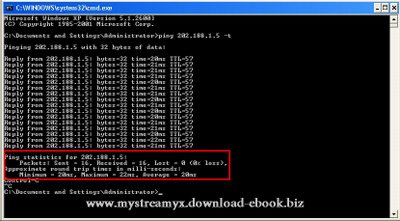
Ping Test

To check connectivity and latency by extended ping to DNS

Start -- Run -- cmd

Open DOS prompt
ping 202.188.1.5
ping 202.188.1.5 -t or
ping 202.188.1.5 -t-n 30

To stop -- Press CTRL + C
Value to check is % packet Loss and Average time