| Email Access |
| Streamyx E-mail Access |
Access your Streamyx mail by following these simple steps:
|
| Pop email Services The other means of obtaining your streamyx email is through the various email programs available such as Microsoft Outlook, Inbox, Netscape Communicator, Outlook Express, etc. For this, you are required to include your email client configuration with the following settings: Incoming mail server: pop.streamyx.com Outgoing mail server: smtp.streamyx.com Do not forget to save these settings. And whenever you login in the future, remember to type in your full username with the domain (example: ali@streamyx.com) to gain access into your account. |

Saturday, January 9, 2010
Streamyx E-mail Access

Monday, November 30, 2009
DNS Setup (STREAMYX) - Win 98
Win98
1.Double Click My Computer
2.Double Click Control Panel-->Network.
3.Make sure customer already install network card.

4.Click Properties

FOR STATIC IP


Wednesday, November 25, 2009
Difficulties connecting to Streamyx
| Difficulties Connection To Streamyx | |||||
| POSSIBLE CAUSE | SOLUTION | ||||
| Telephone lines: Faulty line or suspension of account (because of non-payment) | Check your phone line: • Make sure your phone line is functioning (not suspended) • Lift your receiver and check for a dial tone,noisy line or crossline. If there is no dial tone or problem with the telephone line, call TM Customer Contact Centre (100) and select “Internet Services” to file a fault report. | ||||
| Hardware set-up: Wrongly set-up, loose connection | Check your modem/line/microfilter connectivity: * Ensure all physical connections are done correctly * Ensure all cables are fitted properly * Please ensure your modem is turned on * If still in doubt, try replacing the cables | ||||
| Faulty hardware: Modem, network card, splitter | Check your modem “Link/DSL” light status: * A blinking light may mean a faulty modem, a faulty splitter or a lost connection * Reboot your modem (switch it off, and then on again) * Make a direct connection from the wall socket straight to the modem, bypassing the splitter * If still in doubt, try replacing the cables If the light is still blinking, it may be due to a network problem. Call TM Customer Contact Centre (100) and select “Internet Services” for assistance. Source: http://isp.tm.net.my/ | ||||
Network Interface Card (NIC)
Streamyx info,
We need a Network Interface Card (NIC) when we using a RJ14 cable to the streamyx modem in order for your PC to communicate with the modem. Another choices of coummunication are wirelless and USB.
Check status of NIC
NIC is installed – RJ45 port
- Right click My computer icon –> properties -> Hardware-> Device Manager.
- check on Network Adapters

Check status of LAN
Connect RJ45 to modem. Make sure physical LED at RJ45 port lit up. OR
Start button -> My network place -> view all connection
Make sure Local Area Connection is ‘connected’

What is tmnet streamyx?
What is tmnet streamyx?
Broadband internet access that provides an “always on” connection with speed/bandwidth from 512kbps up to 4.0Mbps. With the high-speed connectivity/bandwidth, the service is ideal to support most broadband applications such as web hosting, video streaming, e-commerce, distance learning and others.
Broadband internet access that provides an “always on” connection with speed/bandwidth from 512kbps up to 4.0Mbps. With the high-speed connectivity/bandwidth, the service is ideal to support most broadband applications such as web hosting, video streaming, e-commerce, distance learning and others.
| Tmnet 1515 (Narrowband) | TMnet streamyx (Broadband) |
| Support all fixed line (CDMA,ISDN,keyphones, PABX, and hunting line. Require dial-up modem | Does not support (CDMA,ISDN,keyphones, PABX, and hunting line. Require DSL modem |
| Charging based on hours spent online | Flat rate charge per month. Unlimited access |
| Connection speed up to 56kbps | Connection speed from 512kbps up to 4 Mbps depend on package subscribed |
Ping Test
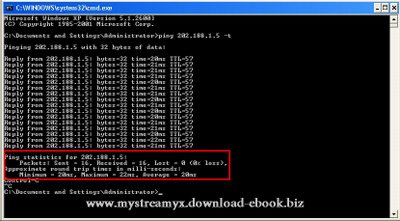
To check connectivity and latency by extended ping to DNS
Start -- Run -- cmd
Open DOS prompt
ping 202.188.1.5
ping 202.188.1.5 -t or
ping 202.188.1.5 -t-n 30
To stop -- Press CTRL + C
Value to check is % packet Loss and Average time

Start -- Run -- cmd
Open DOS prompt
ping 202.188.1.5
ping 202.188.1.5 -t or
ping 202.188.1.5 -t-n 30
To stop -- Press CTRL + C
Value to check is % packet Loss and Average time
How to Change Your Streamyx Password
* Login to the
* Select "Change Password" from Account Management (near the bottom of the page)
| https://tmbill.tm.net.my/SelfCare/Maintenance/selfcareLogin.jsp |
* Select "Change Password" from Account Management (near the bottom of the page)
Subscribe to:
Posts (Atom)